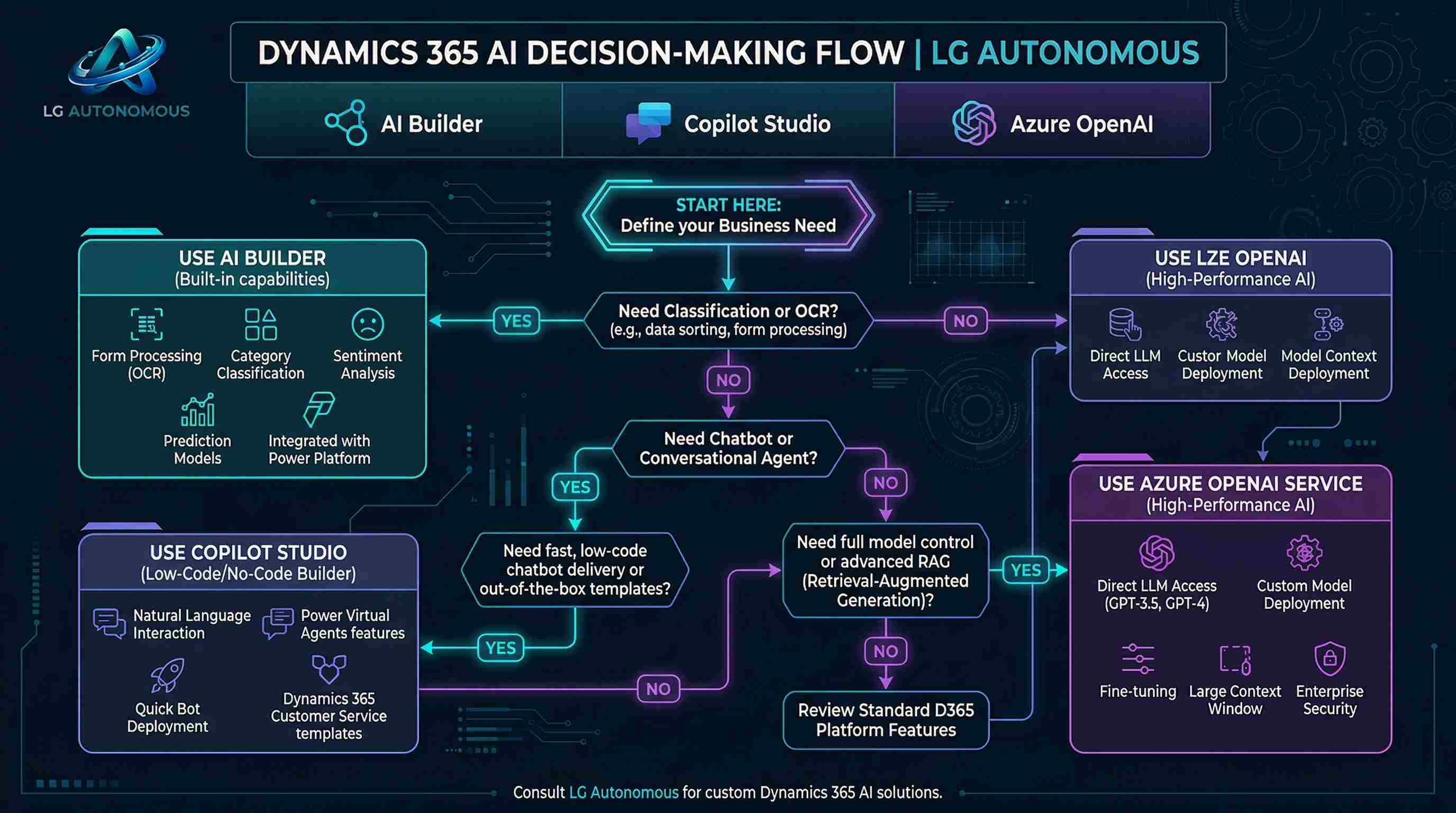
You’ve got three powerful AI engines staring at you: Microsoft Copilot Studio, Azure OpenAI Service, and AI Builder. Each one plugs into Dynamics 365, but picking the wrong one can burn budget or delay your project for months. I’ve seen teams over-engineer simple chatbots and under-deliver on custom document intelligence. Let’s walk through a simple decision framework that works for real business problems.
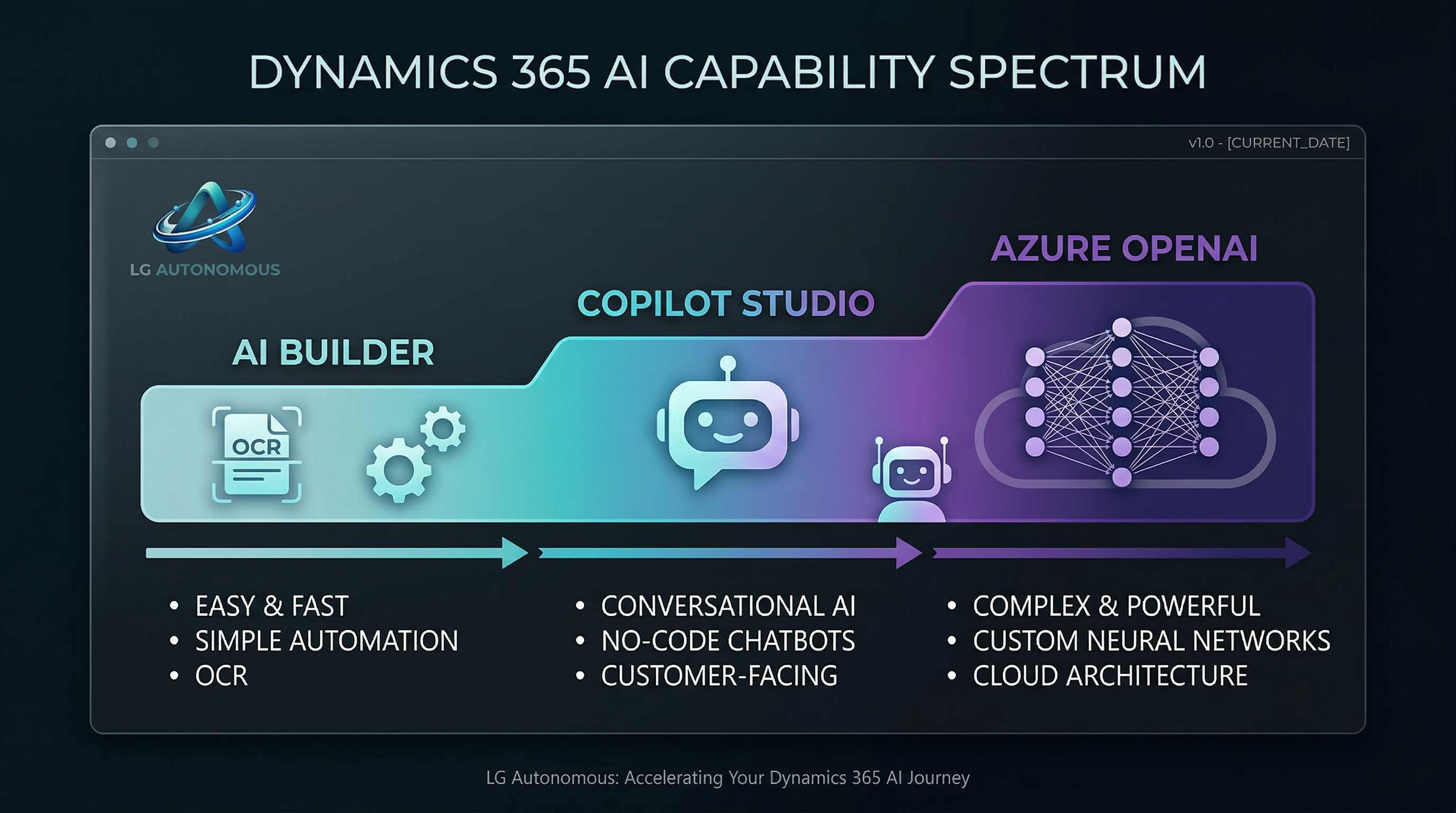
First, understand the spectrum: No-code → Pro-code
Think of these three tools as steps on a staircase. AI Builder sits at the bottom – easiest, quickest, but less flexible. Copilot Studio is the middle – awesome for chatbots and guided conversations. Azure OpenAI is the top – limitless customization, but requires AI engineering skills and cloud architecture.
Deep dive: AI Builder – The Swiss Army Knife for citizen developers
Best for: Business analysts and Power Platform makers who need ready-to-use AI models without writing a single line of code. Drag, drop, and deploy.
Real D365 examples:
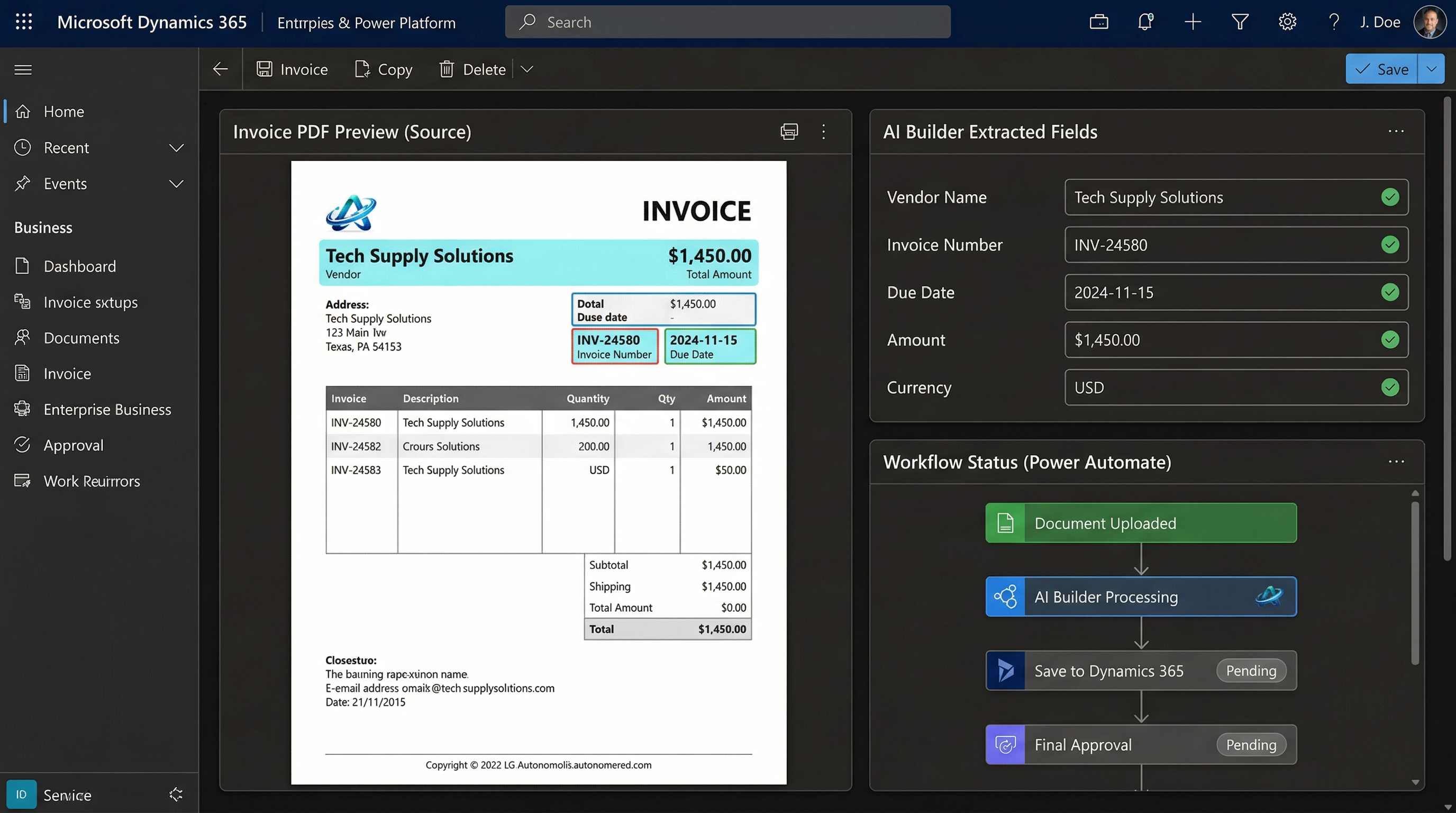
- 📄 Invoice processing: Automatically extract vendor, amount, and due date from PDFs attached to D365 Finance records.
- 💬 Sentiment analysis on case emails: Classify customer satisfaction in real time inside Customer Service workspace.
- 🖼️ Object detection: Identify damaged products from warehouse photos directly in Field Service.
Cost & licensing: AI Builder credits come with Power Apps/Power Automate licenses (starting ~$500/month for 5M credits). Pay-as-you-go also available. Very affordable for transactional AI tasks.
Limitation: No fine-tuning on your own domain-specific data (except for custom form processing). Can't leverage large language models for free text generation.
Copilot Studio (formerly Power Virtual Agents) – Custom conversational AI for D365
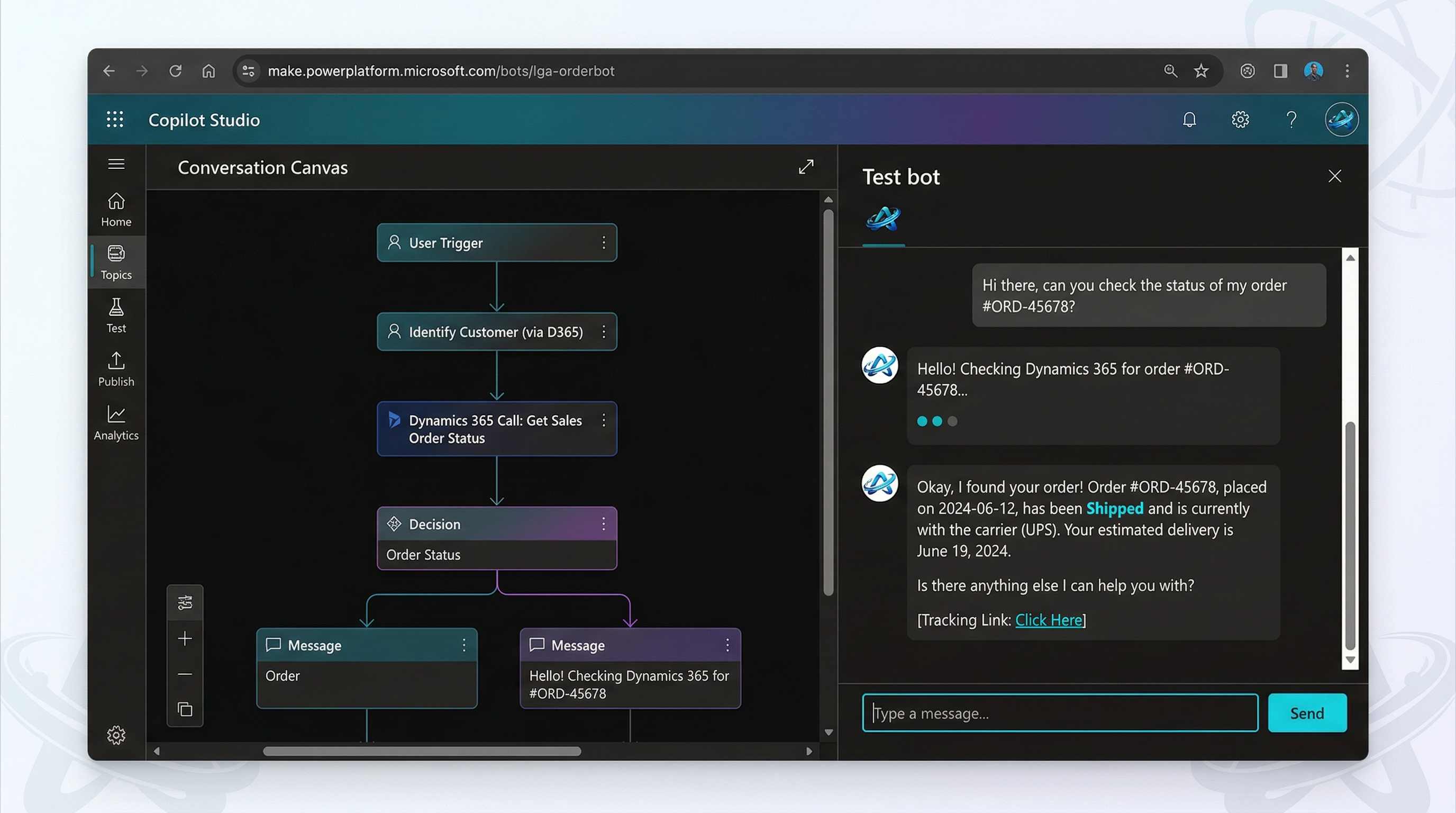
Best for: Building intelligent chatbots and copilots that natively connect to Dataverse, Knowledge Bases, and custom APIs. No-code bot authoring + generative answers.
Real D365 scenarios:
- 🤖 Sales Agent copilot: A bot inside Sales Hub that answers “What’s the latest discount for customer X?” using real-time data from Dynamics 365 Sales.
- 🛠️ Field Service self-service bot: Technicians can ask “Show me unresolved work orders near Chicago” – the bot fetches data and displays cards.
- 📞 Customer support escalation: Conversational hand-off from bot to human agent, pre-loading case context from D365 Customer Service.
- 🔗 Generative answers: Point to SharePoint or website documentation – Copilot Studio will answer using Azure OpenAI under the hood, but with zero infrastructure management.
Cost: Included with certain D365 licenses (e.g., Customer Service Enterprise). Standalone starts at $200 per tenant/month + pay-as-you-go for generative AI messages (~$0.02 per message). Very predictable pricing.
Sweet spot: When you need an interactive, multi-turn conversational experience inside Teams, D365, or custom webchat – without managing prompts or LLM deployments.
Azure OpenAI Service – Full control, ultimate customization
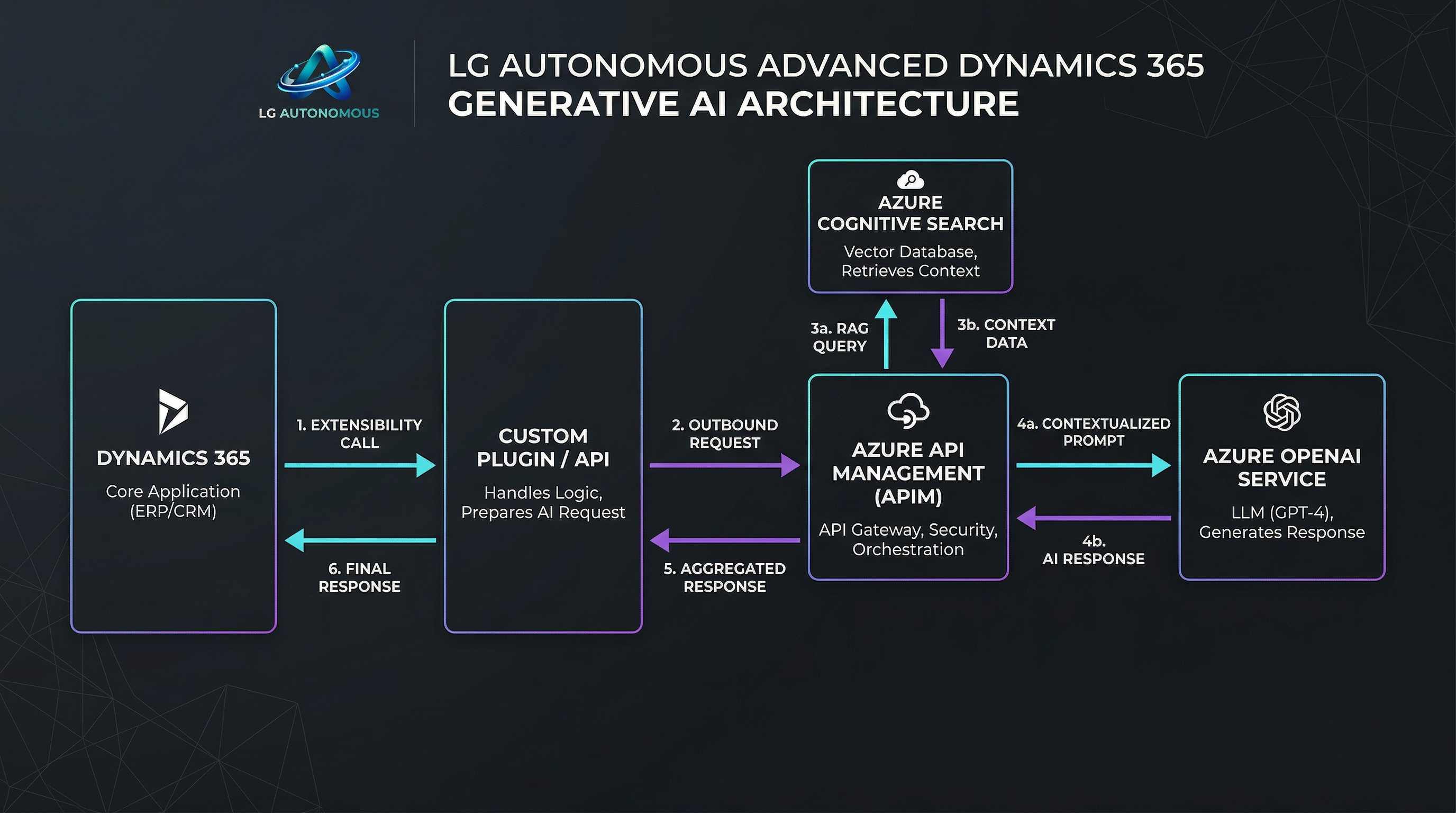
Best for: Enterprise AI teams that need to fine-tune GPT-4o, embed embeddings, build custom semantic search, or create AI agents that reason over massive internal documents. Bring your own data, vectors, and model weights.
D365 use cases that demand Azure OpenAI:
- 📚 Semantic document search over 1M+ product manuals: Use Azure Cognitive Search + OpenAI embeddings to augment D365 Field Service knowledge.
- 🧠 Contract clause analysis: Extract obligations and renewal dates from complex legal PDFs stored in D365 Finance.
- ⚙️ Custom supply chain copilot: Combine Azure OpenAI with D365 Supply Chain Management to “predict delay risks” using internal ERP data and external weather APIs.
- 🎯 Fine-tuned sales email generator: Train GPT on your past winning sales communications to auto-generate personalized emails inside D365 Sales.
Cost & complexity: Pay-as-you-go (per 1K tokens ~$0.0005–$0.03). Hosting, security, prompt engineering, and governance are your responsibility. Requires AI developers, Azure subscription, and careful cost monitoring.
Reality check: Don’t use Azure OpenAI for simple classification or standard chatbots – you’ll overpay and overcomplicate.
Decision matrix: At a glance
| Criteria | AI Builder | Copilot Studio | Azure OpenAI |
|---|---|---|---|
| Technical skill needed | Citizen dev (Power Platform) | Low-code / Maker | Pro-code / ML engineers |
| Time to first value | Hours to days | Days to 2 weeks | Weeks to months |
| Integration with D365 | Native connectors, Dataverse | Native topics, OOB D365 triggers | Custom APIs, plugin steps |
| Generative AI (LLMs) | No | Yes (via generative answers, GPT) | Full (fine-tuning, embeddings) |
| Monthly cost (example) | $300–1000 (credits) | $200 + usage | $500–5000+ (variable) |
3 real-world decision stories from the field
📌 Case 1: Fast approval of supplier invoices (D365 Finance)
Situation: A manufacturing firm receives 2,000 PDF invoices per week. They need 80% automation with minimal IT involvement.
Decision: ✅ AI Builder + Power Automate. Prebuilt invoice processing model extracts headers, line items, and posts to D365 Finance. No code, deployed in 2 days.
Outcome: 75% time saved, payback in 3 months. Using Azure OpenAI would have been overkill.
📌 Case 2: Internal HR copilot for D365 Human Resources
Situation: Global company wants employees to ask “How many vacation days do I have left?” or “When is open enrollment?” via Teams.
Decision: ✅ Copilot Studio + D365 HR Dataverse connector. Built a topic-based bot that queries live employee data. Added generative answers for policy PDFs.
Outcome: 2 weeks to MVP. Reduced HR tickets by 40%.
📌 Case 3: AI-powered sales proposal generator (D365 Sales)
Situation: B2B company needs to automatically draft personalized proposals based on opportunity details, past deals, and competitor data. Requires fine-tuned tone and product knowledge.
Decision: ✅ Azure OpenAI (fine-tuned GPT-4) plus a custom plugin for D365 Sales. Team fine-tuned on 5,000 past proposals.
Outcome: 65% reduction in proposal writing time. But required 3 AI engineers and 3 months. Copilot Studio couldn’t handle the proprietary format fine-tuning.
How to make the final call for your D365 project
Ask yourself these 4 questions before picking a tool:
- Who will build/maintain it? – Business team → AI Builder. Citizen dev + chatbot expert → Copilot Studio. Dedicated AI devs → Azure OpenAI.
- What’s the main interaction mode? – One-shot prediction/classification → AI Builder. Multi-turn conversation → Copilot Studio. Unstructured reasoning & generation → Azure OpenAI.
- Do you need to fine-tune on proprietary data? – No → AI Builder/Copilot Studio. Yes (domain-specific language, legal jargon) → Azure OpenAI.
- What’s your tolerance for complexity & budget? – Low → AI Builder. Medium → Copilot Studio. High but strategic → Azure OpenAI.
Cost comparison with real numbers (April 2026)
- AI Builder: 1M AI Builder credits ~ $500. Processing 10k invoices = ~200k credits → $100. Very cost-effective.
- Copilot Studio: $200 base per tenant + ~$0.02 per generative message. A bot handling 10k conversations/month = $200 + $200 = $400 total. Great for chat volume.
- Azure OpenAI: GPT-4o input ~$2.5 per 1M tokens. For a complex RAG pipeline (10k documents query each month), costs often hit $800–$2,000 plus storage and networking. But value can be huge for strategic differentiators.
Myth busters: Don’t fall for these traps
❌ Myth 1: “Copilot Studio is just for simple FAQ bots.”
✅ Reality: It supports generative AI, adaptive cards, and native D365 triggers. You can build an intelligent order management copilot in days.
❌ Myth 2: “Azure OpenAI is always better because it's more powerful.”
✅ Reality: More powerful = more expensive, slower to market, and higher maintenance. For 80% of D365 scenarios, Copilot Studio or AI Builder are better business choices.
❌ Myth 3: “AI Builder can’t handle custom AI models.”
✅ Reality: AI Builder now supports Power Fx and custom model training for document processing – great for non-generative tasks.
Next steps: Start small, win fast
If you’re building a D365 AI solution next week, follow this blueprint:
- 🟢 Week 1: Prototype with AI Builder (even for a "complex" need) – you’ll often find it’s enough.
- 🟡 Week 2: If you need conversation + D365 data, build a Copilot Studio bot connected to Dataverse.
- 🔴 Month 2+: Only then, evaluate Azure OpenAI for the high-value custom cases that justify dedicated engineering.
Remember: you can mix them. Use AI Builder for OCR, Copilot Studio for the chat interface, and Azure OpenAI for the reasoning step behind the scenes – that’s modern D365 AI architecture.